

Description
Make every introduction count with custom business cards printed around your brand.
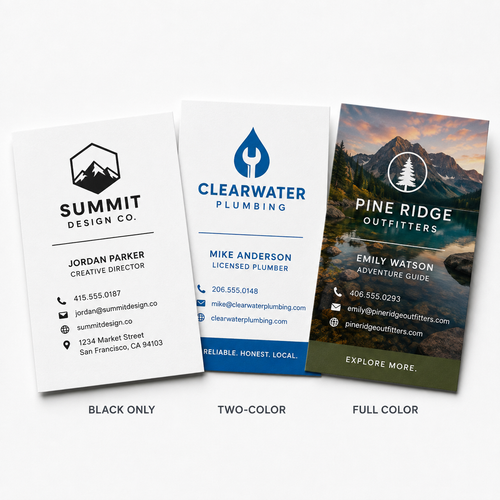
Whether your design uses a simple black logo, two specific corporate colors, or full-color photography and graphics, this product gives you the flexibility to choose the printing method that fits your artwork.
Each card measures the standard 3.5" x 2" business card size and can be designed horizontally or vertically. Print only the front for a simple contact card or use both sides when you need additional room for branding, services, QR codes, social information, or other useful details.
Choose from black, one-color, two-color, or full-color printing along with multiple paper and finish options to create a business card that fits both your brand and your purpose.
Choose Your Printing Option
Different designs call for different printing methods.
Black Printing
Black-only printing is a straightforward choice for simple, professional designs built around typography, line artwork, or a monochrome logo.
It works especially well for:
- Minimal business cards
- Professional services
- Text-focused layouts
- Black logos
- Traditional corporate designs
1-Color Printing
Choose one-color printing when your design relies on a single spot color.
This option works well for:
- Simple logos
- Corporate branding
- One-color artwork
- Schools and organizations
- Brand identities built around one signature color
A specific PMS color can be selected when precise spot-color matching is important.
2-Color Printing
Two-color printing gives you more flexibility while preserving the clean appearance of a spot-color business card.
Use two spot colors for:
- Two-color logos
- Logo + accent color combinations
- Corporate identity systems
- Branded typography
- Simple graphic layouts
PMS color matching allows you to identify the specific spot colors required for your design.
Full-Color Printing
Choose full color when your artwork includes multiple colors or more complex visual elements.
Full-color business cards are ideal for:
- Photography
- Gradients
- Illustrations
- Multi-color logos
- Product images
- Detailed graphics
- Colorful backgrounds
- Full-bleed designs
Full color gives you the greatest flexibility when your business card needs to reproduce detailed artwork rather than one or two designated ink colors.
Spot Color vs. Full Color Business Cards
The main difference between spot-color and full-color business cards is how the colors in your artwork are produced.
Spot-color printing uses specifically selected ink colors. It is particularly useful when your design contains only one or two colors or when matching a specific corporate brand color is important.
Full-color printing combines process colors to reproduce a much wider range of colors and is better suited for photography, gradients, illustrations, and complex multi-color artwork.
Choose Spot Color When:
- Your logo uses one or two colors
- Precise PMS matching is important
- Your design is simple and typography-focused
- You want a traditional corporate appearance
Choose Full Color When:
- Your artwork contains photography
- Your logo uses several colors
- Your design includes gradients
- You want detailed graphics or illustrations
- Your background or artwork extends to the edge
Neither method is inherently better. The right choice depends on how your business card is designed.
Standard 3.5 x 2 Business Card Size
These cards measure 3.5" x 2" when finished, the familiar standard size used for business cards throughout the United States.
The format provides enough room for essential information while remaining compact enough to fit comfortably in wallets, card holders, presentation folders, and networking materials.
A standard business card can include:
- Your name
- Job title
- Company name
- Logo
- Phone number
- Email address
- Website
- Social media information
- QR code
- Address
- Tagline or call to action
Horizontal or Vertical Business Cards
Your 3.5 x 2 card can be designed in either orientation.
Horizontal Business Cards
Horizontal cards use the traditional landscape orientation and provide more space across the card for names, email addresses, websites, and other contact information.
They work well for:
- Corporate designs
- Longer company names
- Multiple contact details
- Traditional branding
- Wide logos
Vertical Business Cards
Vertical business cards use a portrait-style layout that can give your design a more distinctive visual appearance.
They work particularly well with:
- Stacked logos
- Minimal layouts
- Short contact information
- Portrait-style photography
- Modern branding
Both orientations use the same finished 3.5 x 2 dimensions.
One-Sided or Double-Sided Business Cards
Choose how much of the card you want to use.
Front-Only Printing
A one-sided business card keeps everything on a single surface.
This works well when your design only needs:
- Logo
- Name and title
- Phone number
- Website
- Basic company information
Front & Back Printing
Double-sided printing gives you additional room without increasing the size of the card.
Consider using the back for:
- QR codes
- Services
- Appointment information
- Social handles
- Taglines
- Promotions
- Additional branding
- Directions or location information
- Calls to action
Keeping secondary information on the back can also help prevent the front of your card from becoming overcrowded.
Paper & Finish Options
Choose a paper that complements your artwork and the impression you want your business card to create.
Standard Cardstock
A dependable option for everyday business cards, networking, sales teams, and general professional use.
Premium Cardstock
Choose a premium stock when you want the card itself to feel more substantial and presentation is particularly important to your brand.
Glossy Options
Glossy finishes provide additional sheen and work especially well with:
- Photography
- Colorful artwork
- Product images
- Full-color logos
- Bold graphics
Available stocks and finishes may vary depending on the printing option selected.
Business Cards with PMS Color Matching
When consistent brand colors matter, choose one- or two-color spot printing and specify the appropriate PMS color.
PMS, or the Pantone Matching System, assigns standardized references to individual colors. This allows a particular spot ink to be identified rather than relying only on a visual description such as “dark blue” or “bright red.”
PMS color matching is particularly useful for:
- Corporate identity systems
- Branded logos
- Franchise locations
- Organizations with established color standards
- Reorders where consistent spot colors are important
If your artwork uses many colors, photography, or gradients, full-color printing will generally be the more appropriate choice.
What Should You Put on a Business Card?
A good business card makes it easy for someone to remember who you are and contact you later.
Consider including:
- Your name
- Job title
- Company or organization name
- Logo
- Phone number
- Email address
- Website
- Relevant social media profile
- QR code
- Business address, when useful
You do not need to include every possible detail.
Prioritize the information customers or professional contacts actually need, then use the available space to keep your branding clear and easy to read.
Popular Uses for Custom Business Cards
Small Businesses
Give customers a convenient physical reminder of your company and an easy way to contact you later.
Sales Professionals
Hand out cards after meetings, prospecting, presentations, and customer visits.
Real Estate
Include agent branding, phone numbers, email addresses, websites, and QR codes linking to property searches or listings.
Financial & Professional Services
Create consistent business cards for advisors, attorneys, accountants, insurance professionals, consultants, and other client-facing teams.
Healthcare
Print cards for physicians, providers, practices, offices, referral contacts, and other healthcare professionals.
Contractors & Home Services
Make it easy for customers to keep your phone number and contact information for future service.
Nonprofits & Churches
Create cards for staff members, ministries, programs, outreach teams, and organizational contacts.
Events & Networking
Keep professionally printed cards ready for trade shows, conferences, networking events, and business meetings.
Business Cards for Presentation Folders
Custom business cards are a natural addition to sales packets, client presentations, and welcome materials.
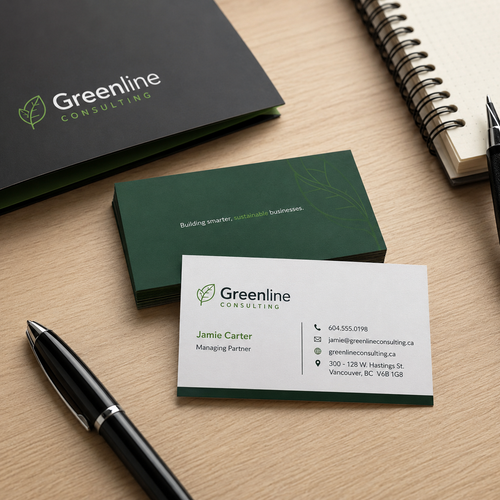
Many presentation folders include optional business card slits, allowing a salesperson, advisor, agent, or representative's card to stay directly with the documents inside.
Pair your business cards with:
- Custom presentation folders
- Brochures
- Sell sheets
- Proposals
- Letterhead
- Forms
- Welcome packets
Using consistent branding across these pieces creates a more unified professional presentation.
What Is a Custom Business Card?
A custom business card is a printed card personalized with a person or organization's branding and contact information.
Standard U.S. business cards generally measure 3.5 x 2 inches and may include a logo, name, title, phone number, email address, website, QR code, and other useful business information.
Custom business cards may be printed in black, one or more spot colors, or full color depending on the artwork and printing method selected.
They are commonly exchanged during meetings, sales calls, networking events, appointments, conferences, and other professional interactions.
Artwork Guidelines
Prepare your artwork around the printing option you select.
For best results:
- Use the correct 3.5 x 2 business card template.
- Submit print-ready artwork.
- Use high-resolution graphics at approximately 300 DPI.
- Use CMYK artwork for full-color printing.
- Clearly specify PMS colors when using spot-color printing.
- Include the required bleed for designs that extend to the edge.
- Keep names, logos, and other important content within the safe area.
- Embed or outline fonts.
- Clearly identify front and back files when printing both sides.
- Confirm that the artwork orientation matches your horizontal or vertical selection.
Frequently Asked Questions
What size are these business cards?
The finished cards measure 3.5" x 2", the standard U.S. business card size.
What printing options are available?
Choose from black, one-color, two-color, or full-color printing depending on your artwork.
What is the difference between one-color and two-color printing?
One-color printing uses a single designated ink color. Two-color printing uses two designated colors, making it useful for logos or branding built around a two-color palette.
What is PMS color matching?
PMS refers to the Pantone Matching System. It allows specific spot ink colors to be identified for designs where consistent brand-color reproduction is important.
What is the difference between spot color and full color?
Spot-color printing uses designated ink colors and works well for simple one- or two-color designs. Full-color printing is better suited for photography, gradients, illustrations, and artwork containing many different colors.
Can I print in black only?
Yes. Black printing is available for simple monochrome business-card designs.
Can business cards be printed on both sides?
Yes. Choose front-only or front-and-back printing depending on how much information your design requires.
Can I design my cards vertically?
Yes. Business cards can be designed horizontally or vertically while maintaining the same 3.5 x 2 finished dimensions.
Can my artwork print all the way to the edge?
Full-bleed designs are available with compatible printing configurations when the artwork is prepared with the required bleed area.
Can I include a QR code?
Yes. QR codes can be incorporated into your artwork and can link to websites, booking pages, menus, portfolios, contact information, or other online destinations.
What paper options are available?
Standard cardstock, premium cardstock, and glossy finish options are available. Exact paper choices may depend on the selected printing method.
What should I put on my business card?
Common information includes your name, title, company, logo, phone number, email address, website, and other relevant contact information.
What file should I upload?
Use print-ready artwork created with the correct business card template. For full-color designs, use CMYK artwork. For spot-color printing, clearly identify the requested PMS color or colors.