
Custom Folders
Turn proposals, brochures, forms, sales materials, and client documents into a polished branded package. Choose from full-color printing, foil stamping, reinforced two-pocket folders, or request a custom configuration built around your project.



Which Custom Folder Should You Choose?
Start with the feature that matters most to your project. Printing method, pocket construction, and size can all affect which folder is the best fit.
| Folder Option | Best For | Key Feature |
|---|---|---|
| Full Color | Photography, graphics, marketing kits, branded presentations | Detailed multi-color artwork |
| Foil Stamped | Premium presentations, professional services, luxury or formal branding | Specialty foil impression |
| Reinforced Two-Pocket | Proposals, sales packets, client materials, everyday presentations | Two reinforced 4-inch pockets |
| Custom Quote | Specialty sizes, unique pockets, custom stocks and configurations | Flexible project specifications |
What Size Presentation Folder Do You Need?
Folder dimensions should be selected around the documents you need to hold. For most business presentations, 9 x 12 is the standard starting point.
9 x 12 Presentation Folders
A 9 x 12 presentation folder is designed to hold standard 8.5 x 11 letter-size sheets without requiring the documents to be folded.
- Proposals and contracts
- Brochures and sell sheets
- Forms and reports
- Client welcome materials
- Marketing and sales packets
Legal-Size Presentation Folders
Need additional height for legal-size documents? Our custom folder quote option can accommodate configurations such as 9 x 14.5 presentation folders.
This is a practical option for legal, financial, insurance, real estate, and other document-heavy applications.
Request a Legal-Size QuoteChoose Your Pocket Configuration
Interior pockets help organize documents and determine how customers interact with the materials inside your folder.
Two-Pocket Folders
One pocket on each side provides a simple way to divide information into separate groups.
For example: company information on the left and pricing, forms, or proposals on the right.
One-Pocket Folders
A streamlined option for smaller presentation packets or projects where only one document pocket is needed.
Available through select folder configurations and custom quote options.
Reinforced Pockets
Reinforced pocket edges add additional structure around the interior pockets and create a polished presentation.
A strong option for proposals, sales materials, and presentation packets that may be handled repeatedly.
Presentation Folders with Business Card Slits
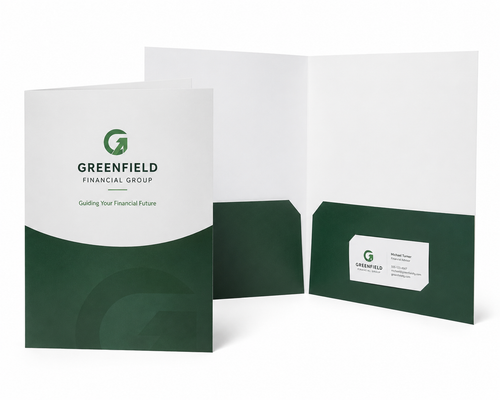
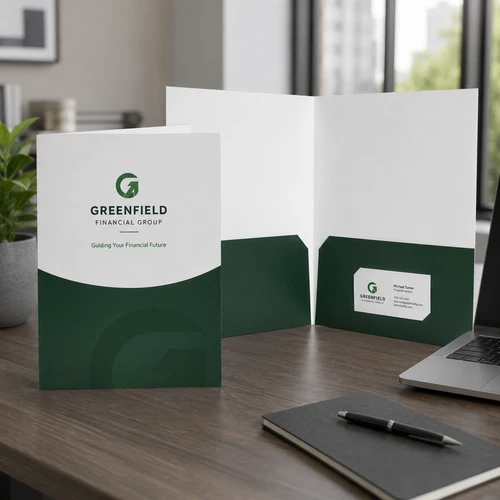
Add a business card directly inside your presentation folder so customers can easily identify their salesperson, advisor, agent, representative, or primary contact.
Depending on the folder configuration, card slits may be available on the left pocket, right pocket, or both pockets.
- Sales representatives
- Real estate agents
- Financial advisors
- Healthcare professionals
- Consultants and account managers
Keep the Card with the Packet
A business card slit keeps contact information physically connected to the proposals, brochures, forms, or other materials inside the folder.
Full-Color vs. Foil Stamped Folders
Both options can create a professional presentation, but they produce very different visual results.
Choose Full Color When...
Your folder design relies on detailed or multi-color artwork.
- Photography
- Gradients
- Illustrations
- Multiple brand colors
- Detailed graphics
- Full-color logos
Choose Foil When...
You want selected design elements to create a more decorative or premium visual impression.
- Company logos
- Brand names
- Titles
- Seals and emblems
- Monograms
- Simple premium branding
What Are Custom Presentation Folders?
Custom presentation folders are branded folders designed to organize and present printed documents such as proposals, brochures, forms, reports, and sales materials.
Standard presentation folders commonly measure 9 x 12 inches, allowing standard 8.5 x 11 documents to fit inside without folding. Interior pockets keep multiple pieces together while the exterior provides space for your company logo, branding, artwork, or messaging.
Presentation Folder vs. Pocket Folder
The terms presentation folder and pocket folder are often used interchangeably. “Pocket folder” describes the physical construction with interior pockets, while “presentation folder” describes the product's common use for professionally organizing and presenting documents.
Popular Uses for Custom Folders
Custom presentation folders can turn a collection of individual printed pieces into one organized, branded package.
Sales & Proposals
Organize proposals, price sheets, case studies, brochures, and supporting sales materials.
Client Welcome Packets
Combine onboarding documents, instructions, forms, brochures, and contact information.
Real Estate
Present property details, contracts, financing information, floor plans, and agent materials.
Healthcare
Package patient forms, service information, instructions, and educational materials.
Schools & Universities
Create enrollment packets, orientation materials, program information, and student resources.
Nonprofits & Churches
Organize campaigns, programs, fundraising materials, supporter information, and community resources.
Events & Conferences
Provide schedules, brochures, speaker materials, sponsor information, and event documents.
Professional Services
Create polished packets for financial, legal, insurance, consulting, and corporate presentations.
More Than Just a Folder
Pair your custom folder with coordinated printed materials to create a complete presentation, sales, or welcome packet.
Custom Brochures
Add company, service, campaign, or product information inside your presentation folder.
Shop Brochures →Business Cards
Add a matching business card to an optional pocket slit so recipients always have your contact information.
Shop Business Cards →Letterhead
Include proposals, letters, estimates, or personalized correspondence on matching branded stationery.
Shop Letterhead →Custom Envelopes
Coordinate your folder and enclosed materials with branded envelopes for mailing or document distribution.
Shop Envelopes →Preparing Your Presentation Folder Artwork
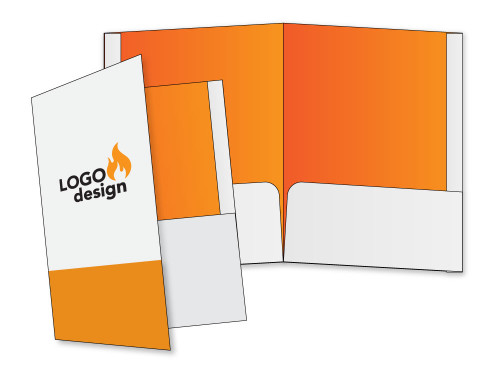
Folder artwork requires more setup than a standard flat printed sheet because the design must account for folds, pockets, die cuts, trim areas, and optional business card slits.
Artwork Checklist
- Use the template for the exact folder style
- Submit print-ready artwork
- Use CMYK for full-color printing
- Use approximately 300 DPI images
- Include the required bleed
- Keep important content inside safe areas
- Embed or outline fonts
Design Around the Folder Construction
Do not design a presentation folder as a simple 9 x 12 rectangle.
Your design must account for the full production template, including exterior panels, folds, pockets, die-cut edges, trim areas, and optional business card slits.
Carefully verify inside and outside panel orientation before submitting your artwork.
Custom Folders Made for Your Presentation
From straightforward two-pocket folders to custom sizes and specialty finishes, GW Print can help you choose a folder configuration that fits your documents and your brand.
Multiple Printing Options
Choose full color, spot-color printing, foil stamping, and other available finishing options depending on your folder style.
Flexible Configurations
Select standard folder products or request a custom quote when your project requires a different size, stock, pocket, or construction.
Help Before Production
Use the correct production template and review your artwork carefully before your presentation folders move into production.
Custom Presentation Folder FAQs
What is a presentation folder?
A presentation folder is a branded folder designed to organize and present documents such as proposals, brochures, forms, reports, and sales materials.
What is the standard presentation folder size?
9 x 12 inches is a common presentation folder size because it comfortably holds standard 8.5 x 11 letter-size documents without folding them.
Will 8.5 x 11 paper fit inside a 9 x 12 folder?
Yes. A 9 x 12 presentation folder is specifically sized to accommodate standard 8.5 x 11 sheets.
What is the difference between a presentation folder and a pocket folder?
The terms are often used interchangeably. Pocket folder describes the construction with interior pockets, while presentation folder describes its common use for organizing and presenting business materials.
What is the difference between full-color and foil stamped folders?
Full-color printing is ideal for photographs, gradients, detailed graphics, and multi-color artwork. Foil stamping applies a specialty foil to selected elements such as logos, names, titles, or emblems.
What are reinforced folder pockets?
Reinforced pockets include added structure around the pocket edges, helping create a more substantial interior construction for presentation materials.
Can presentation folders include business card slits?
Yes. Depending on the folder configuration, business card slits may be available on the left pocket, right pocket, or both pockets.
What can I put inside a presentation folder?
Presentation folders can hold proposals, brochures, flyers, sell sheets, forms, price lists, reports, contracts, welcome documents, and other printed materials.
Do you offer legal-size presentation folders?
Legal-size configurations may be available through our Custom Folder Quote product, including options designed for documents larger than standard letter size.
Can I request a custom folder configuration?
Yes. If your project requires a different folder size, pocket configuration, paper stock, printing method, or specialty feature, use our Custom Folder Quote option.
What artwork file should I use?
Use print-ready artwork prepared with the production template for your exact folder style. The file should account for trim, bleed, folds, pockets, die cuts, and any optional business card slits.
Put Your Brand on Every Part of the Presentation
Choose a standard custom presentation folder or tell us about your project and we'll help you find a configuration that fits.